
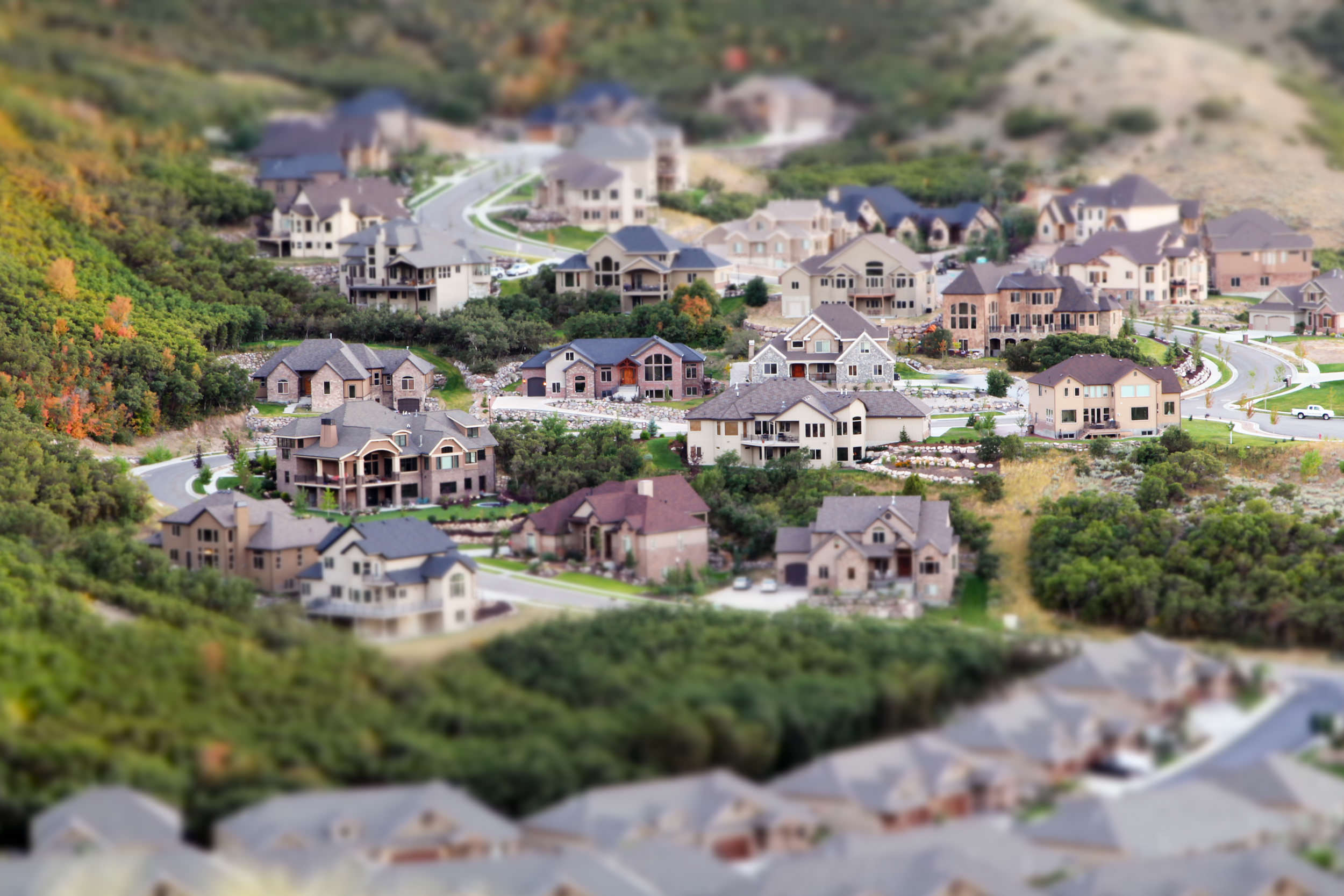
This weekend I hiked up a small hill with a bunch of other photographers to photograph the sunset and night shots of the Salt Lake Valley and realized it was a perfect opportunity to use one of the 60D’s in-camera creative filter. The above image was photographed and edited in-camera, with no other edits applied in post-processing (other than adding my little watermark to the bottom-right).
While it is possible to add this effect to images in post-processing it’s really easy to do it in-camera using the 60D’s creative filters, and it’s probably my favorite filter that the 60D has to offer so far. I am, of course, always a much bigger fan of doing these things in-camera with real lenses and stuff (as opposed to any type of software), so of course it would be much more fun to use an actual tilt-shift lens (click here to see an example of a tilt-shift lens in-use). However those lenses are extremely niche and very expensive, so using software to re-create this effect is probably a much more economical way to get this look.
If you’re interested in more info on this camera be sure to check back later … I’ll be posting more thoughts about the 60D here on my blog throughout the week.
This weekend I hiked up a small hill with a bunch of other photographers to photograph the sunset and night shots of the Salt Lake Valley and realized it was a perfect opportunity to use one of the 60D’s in-camera creative filter. The above image was photographed and edited in-camera, with no other edits applied in post-processing (other than adding my little watermark to the bottom-right).
While it is possible to add this effect to images in post-processing it’s really easy to do it in-camera using the 60D’s creative filters, and it’s probably my favorite filter that the 60D has to offer so far. I am, of course, always a much bigger fan of doing these things in-camera with real lenses and stuff (as opposed to any type of software), so of course it would be much more fun to use an actual tilt-shift lens (click here to see an example of a tilt-shift lens in-use). However those lenses are extremely niche and very expensive, so using software to re-create this effect is probably a much more economical way to get this look.
If you’re interested in more info on this camera be sure to check back later … I’ll be posting more thoughts about the 60D here on my blog throughout the week.

Nicole is a photographer, published author, and educator specializing in Lightroom, Photoshop, and photography. She is best known for her books on food photography but is widely versed in various photographic genres, including landscape, nature, stock, travel, and experimental imagery.



For an in-camera effect, it’s actually pretty impressive! So amazing to see S. Mountain in miniature! :)
Going out on a limb here: but is 1.6 seconds a typo? 1/6? or 1/60th?
Regardless, it’s very cool.
@Ben – Nope, not a typo. It was just after sunset and my aperture was really small, so I needed a longer shutter speed. The camera was on a tripod for this shot.
And that just makes this shot that much more awesome.
I really like this effect! It really pops this image.
nice camera
Hi, is this tilt-shift effect also usable for video sequences?
Thanks!
Ossi – I’ve never tried doing it for video … doing it this way would mean editing each frame. I’m sure there’s a quicker way but I don’t know how off the top of my head.
@Ossi & Nicole: I just got this camera and it’s amazing, I used to do this effect with Photoshop, but is nice to have the option to do it in camera.
Here is the same effect on a video (the intro of the already cancelled TV show “Dollhouse” from FOX, USA)
http://www.youtube.com/watch?v=I0jDdm0HV9c
i have a 60d and was wondering how can i apply the filters out of camera
I have a tutorial on how to do this in Photoshop: https://nicolesy.com/2010/09/21/two-minute-tip-fake-tilt-shift-lens-effect/
Hi Nicole, thank you for smart method to achieve this effect in PS! But have you noticed, that miniature effect in canon 60d is not limited to blur? It seems to me that the colors are processed very well. And I’d like to know, how?..
For example, https://lh3.googleusercontent.com/-pm_VB9BdeHs/Tu3a6LV1h_I/AAAAAAAAABc/2T1mAtpDGaA/s1000/Untitled-1.jpg
Usually any “miniature” effect, whether it’s in-camera or in a camera-phone app, tends to add a bit of extra contrast and saturation to an image.
Well, I’m impressed how accurate in-camera algorithm adds saturation and contrast to picture. I tried to achieve this in PS, and I only got poisonous colors, (not rich, but simply toxic) – cyan sky, chartreuse green)…
do you know how to do these effect in video??
I don’t think you can do it in-camera to a video with the 60D without a tilt-shift lens, and doing it in post-processing would be extremely time-consuming since you’d have to apply the same effect to every frame of video (at least 24 frames per second of video).
you should be able to pull it off using after effects or a similar effects package. of course, if the camera/subject moves within the video, you may want to adjust/animate the area of focus and that would be time consuming and clunky. but for a tripod shot like in the photo above maybe with cars moving along the street, etc, it could work quite well. maybe even with some timelapse.
Hi
Do you know if Canon has any software that I can use to add the creative filters using my computer. Sometimes I just don’t have the time to do them in Camera. I just want to dowload everything and edit later.
Thanks
Dan
I’m not sure about Canon, but onOne Software has one called “FocalPoint”, you can add tilt-shift looks using that. (I have a coupon code with them you can use, “NICOLESY” for 15% off). :)
Or, if you already have Photoshop CS6, they added a “blur” gallery that does something similar.